

Quick Answer: You can enrich B2B leads with real-time intent signals (hiring activity, funding rounds, tech stack changes) using your own infrastructure instead of paying $3,000+/month for data providers for your gtm (go-to-market) motion. This workflow uses Make/n8n automation, Perplexity AI (with web search), and Google Sheets/Excel to capture signals like "actively hiring SDRs," "raised Series A in last 90 days," or "migrating from HubSpot to Salesforce"—automatically enriching leads exported from Apollo, Clay, or Lemlist before syncing back to your CRM.
Why are traditional lead enrichment tools becoming too expensive?
If you're running outbound at any scale, you've hit this problem: data enrichment platforms charge per credit, per contact, per search—and the bill adds up fast.
ZoomInfo, Clearbit, Apollo, Clay enrichment costs: €1,500-€4,000/month for a typical B2B revenue team (5-8 people across Sales and Marketing combined).
The bigger issue? Most enrichment tools give you static data (company size, industry, tech stack) that doesn't tell you why now matters. They don't answer:
- Is this company actively hiring for roles that indicate budget?
- Did they just raise funding (meaning they have money to spend)?
- Are they experiencing rapid growth (job postings up 40% in 90 days)?
- Did they recently switch tools (indicating openness to new vendors)?
These are intent signals—the difference between a cold prospect and a warm one. And traditional data providers either don't capture them or charge premium pricing for "buyer intent" add-ons.
According to Gartner's 2024 B2B Sales Technology Survey, 67% of B2B sales teams cite "lack of timely buyer intent data" as their top prospecting challenge, despite spending an average of $4,200/month on data enrichment tools.
There's a better way: build your own enrichment infrastructure using AI agents that search for real-time signals, controlled by you, billed through your existing AI API credits.
How does DIY lead enrichment work?
The core idea is simple: instead of paying a data vendor to enrich leads, you use AI agents with web search capabilities to find the information yourself—automatically, at scale, for pennies per lead.
Here's the architecture:
Step 1: Export your lead list from your prospecting tool (Apollo, Clay, Lemlist, or any other)
Step 2: Structure the data in Google Sheets or Excel with columns for each intent signal you want to capture
Step 3: Trigger an automation workflow (Make/n8n) when a new row is added or when an enrichment field is empty
Step 4: For each intent signal, send company data to a specialized AI agent (Perplexity Sonar Pro with web search)
Step 5: Agent returns structured data as JSON, which gets parsed and written back to your spreadsheet
Step 6: Sync enriched data back to your CRM or outreach tool via API
Total cost: €0.05-€0.08 per lead enriched (for 2-3 intent signals per lead using Perplexity Sonar Pro)
Total setup time: 4-8 hours for basic workflow, expandable as needed
Let's break down each step.
Step 1: Export and structure your lead data
Start with your existing prospecting workflow. Whether you're using Apollo, Clay, Lemlist, Instantly, or building lists manually, the first step is getting your leads into a structured format.
Export Options:
Option A: API Export (Recommended for automation)
- Apollo API, Clay API, Lemlist API all support automated exports
- Set up a daily or weekly sync to pull new leads automatically
- Best for: Teams adding 50+ leads per week
Option B: Manual CSV Download
- Export from your prospecting tool as CSV
- Upload to Google Sheets or Excel Online
- Best for: Testing the workflow or smaller lead volumes (<100 leads/week)
Required Data Fields:
Your spreadsheet needs these minimum columns:
Enrichment Signal Columns:

Add one column per intent signal you want to capture. This is critical: each column represents a specific question you're asking the AI agent.
These fields are up to you and what you need. Use this an example.
Example signal columns:
Important: Start with 2-3 signals. Don't try to enrich 10 different signals at once, it increases cost and complexity. Pick the signals that most strongly correlate with your ICP being in-market.
Sample Spreadsheet Structure:
| company_name      | website_url        | contact_name | hiring_sdr_signal | funding_recent | tech_stack_changes |
|-------------------|--------------------|--------------|-------------------|----------------|-------------------|
| CloudMetrics GmbH | cloudmetrics.io    | Anna Müller  | [empty]           | [empty]        | [empty]           |
| DataStack Inc     | datastack.com      | John Smith   | [empty]           | [empty]        | [empty]           |
| SalesBoost AG     | salesboost.de      | Maria Weber  | [empty]           | [empty]        | [empty]           |
When the workflow runs, those empty fields get populated with real-time intelligence.
Step 2: Set up the automation workflow trigger
Now I connect your spreadsheet to Make or n8n so enrichment happens automatically.
Trigger Options:
Option A: New Row Added (Real-time enrichment)
- When to use: You add leads continuously throughout the week
- How it works: Every time a new row appears in Google Sheets, workflow fires immediately
- Make.com module: "Google Sheets → Watch Rows"
- n8n node: "Google Sheets Trigger (On Row Added)"
Option B: Empty Field Detection (Batch enrichment)
- When to use: You upload large lead lists periodically
- How it works: Scheduled check (every 6 hours, daily, etc.) looks for rows where enrichment columns are empty
- Make.com module: "Google Sheets → Search Rows" with filter
WHERE hiring_sdr_signal IS EMPTY - n8n node: "Google Sheets (Read)" with filter condition
Recommended approach for testing: Start with Option B (scheduled batch) so you can control when enrichment runs and monitor costs. Once validated, switch to Option A for real-time.
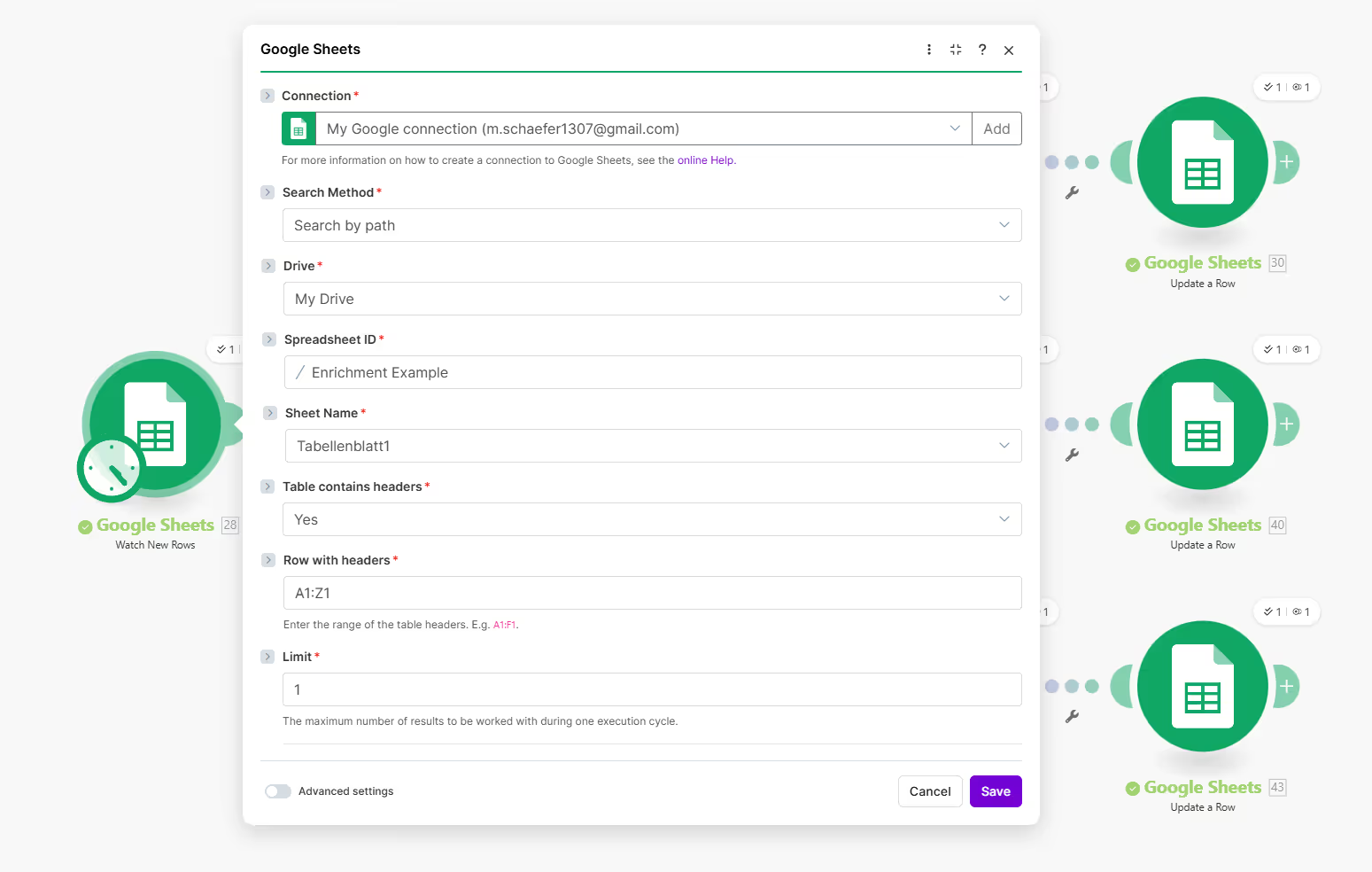
Make.com Setup Example:
Module 1: Google Sheets → Watch Rows
- Spreadsheet: [Your Lead List]
- Sheet: Sheet1
- Trigger Column: All columns
- Interval: Every 15 minutes

Module 2: Router
- Route lead information to specific agents
n8n Setup Example:
Node 1: Schedule Trigger
- Interval: Every 6 hours

Node 2: Google Sheets (Read)
- Operation: Read rows
- Spreadsheet ID: [Your sheet ID]
- Sheet Name: Sheet1

Node 3: Filter
- Condition: {{$json.hiring_sdr_signal}} IS EMPTY
- Keep if: True
Why filter for empty fields? You don't want to re-enrich leads you've already processed. This ensures you only spend API credits on new, unenriched leads.
Step 3: Build specialized AI agents for each intent signal
This is where the magic happens. Instead of sending one generic "enrich this lead" prompt, you create specialized agents—each focused on finding one specific signal with precision.
Why specialized agents instead of one generic enrichment prompt?
Generic approach (doesn't work well):
"Tell me everything about CloudMetrics GmbH: hiring, funding, tech stack, growth signals"Result: Vague, unfocused output that misses nuances and returns irrelevant information.

Specialized approach (works):
Agent 1: "Is CloudMetrics GmbH actively hiring SDRs or BDRs?
Check LinkedIn jobs, company careers page, and recent posts."

Agent 2: "Has CloudMetrics GmbH raised funding in the last 12 months?
Check Crunchbase, press releases, and founder LinkedIn posts."

Agent 3: "Is CloudMetrics GmbH migrating CRM or marketing automation tools?
Check job postings, tech stack signals, and blog posts mentioning tool changes."
Result: Specific, actionable answers with sources and dates.
Agent Setup: Perplexity Sonar Pro
I use Perplexity AI's Sonar Pro model because it has built-in web search and returns cited sources, critical for verifying intent signals.
Why Perplexity vs OpenAI/Claude?
- Perplexity Sonar Pro searches the web natively (Google, LinkedIn, news sites, company websites)
- Returns citations with URLs so you can verify signals
- Faster than chaining GPT-4 with a separate search API
- Cost: $5 per 1,000 requests (Sonar Pro)
Alternative: If you prefer OpenAI, use GPT-4 + Exa.ai or Tavily search API for web access.
Prompt Template for Intent Signal Agents:
Here's the exact prompt structure for each signal type (these are examples. Specify each agent depending on the signals you want to research):
Agent 1: Hiring Signal Detection
You are a B2B sales intelligence analyst specializing in hiring signals.

Task: Determine if {{company_name}} is actively hiring for Sales Development Representatives (SDRs),
Business Development Representatives (BDRs), or Account Executives (AEs).

Search:
- Company website: {{website_url}}
- LinkedIn jobs for this company
- Recent LinkedIn posts from the company page
- Job boards mentioning this company

Return your findings in this exact JSON format:

{
  "is_hiring": true/false,
  "roles_hiring_for": ["SDR", "BDR", "AE"],
  "number_of_open_roles": 0,
  "date_posted": "2024-12-15",
  "source_url": "https://linkedin.com/jobs/...",
  "confidence": "high/medium/low",
  "notes": "Brief context about the hiring activity"
}

Rules:
- Only return JSON, no explanations
- Set is_hiring to FALSE if no relevant roles found in last 90 days
- Include source URL for verification
- Be specific about role types (don't mix engineering with sales roles)
Agent 2: Funding Signal Detection
You are a B2B sales intelligence analyst specializing in funding signals.

Task: Determine if {{company_name}} has raised venture capital or private
equity funding in the last 12 months.

Search:
- Crunchbase for {{company_name}}
- Press releases and news articles
- LinkedIn posts from founders or company page announcing funding
- Tech news sites (TechCrunch, VentureBeat, etc.)

Return your findings in this exact JSON format:

{
  "raised_funding": true/false,
  "funding_round": "Pre-Seed/Seed/Series A/Series B/Series C/Growth",
  "amount": "€8M",
  "date_announced": "2024-10-15",
  "lead_investor": "Venture Partners",
  "source_url": "https://techcrunch.com/...",
  "confidence": "high/medium/low",
  "notes": "Brief summary of the funding announcement"
}

Rules:
- Only return JSON, no explanations
- Set raised_funding to FALSE if no funding found in last 12 months
- Include source URL for verification
- Specify currency (€, $, £) in amount field
Agent 3: Tech Stack Migration Signal
You are a B2B sales intelligence analyst specializing in technology adoption signals.

Task: Determine if {{company_name}} is currently migrating or
evaluating new CRM, marketing automation, or sales engagement tools.

Search:
- Job postings mentioning "migration," "implementation," or specific tool names
- Company blog posts about tool evaluations
- LinkedIn posts from employees mentioning tool changes
- Tech stack data from BuiltWith or similar (if accessible)

Return your findings in this exact JSON format:

{
  "migration_detected": true/false,
  "tool_category": "CRM/Marketing Automation/Sales Engagement/Customer Success",
  "migrating_from": "HubSpot",
  "migrating_to": "Salesforce",
  "migration_stage": "Evaluating/Implementing/Recently Completed",
  "date_signal_detected": "2024-11-20",
  "source_url": "https://company.com/blog/...",
  "confidence": "high/medium/low",
  "notes": "Brief description of the migration context"
}

Rules:
- Only return JSON, no explanations
- Set migration_detected to FALSE if no signals found in last 6 months
- Include source URL for verification
- Distinguish between "considering" and "actively implementing"
Workflow Setup in Make/n8n:
For each intent signal column use the provided node for Ai agents. for make choose Perplexity from the the node selector menu. For n8n use the 'AI Agent' node, add a new model and choose Perplexity Sonar. Configure them as required.
Critical setting: "temperature": 0.1 keeps responses consistent and factual (not creative).
Step 4: Parse JSON responses and write back to spreadsheet
Each AI agent returns data in JSON format. Now I need to extract the structured fields and write them back to your Google Sheet.
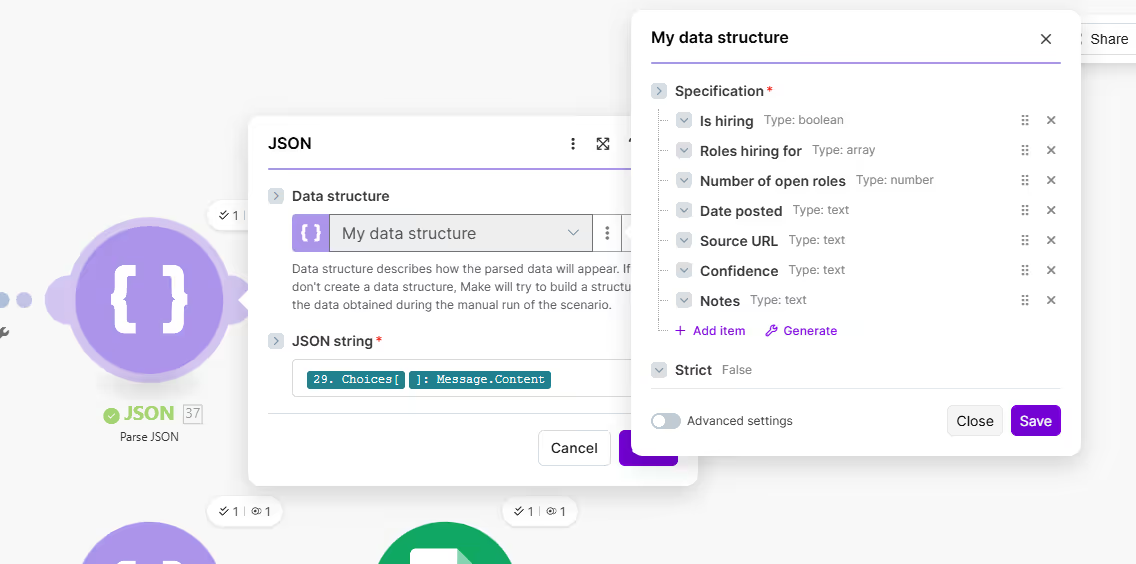
JSON Parsing:
Make.com: Use built-in JSON parser
Module: Tools → Parse JSON
Input: {{output from HTTP request}}
Data Structure: Auto-detect or define schema
n8n: Use "Set" node to extract fields
Node: Set
Mode: Manual Mapping
Mappings:
  - is_hiring: {{$json.response.choices[0].message.content.is_hiring}}
  - roles_hiring_for: {{$json.response.choices[0].message.content.roles_hiring_for}}
  - source_url: {{$json.response.choices[0].message.content.source_url}}
Write Back to Google Sheets:
Make.com Module: Google Sheets → Update a Row
Spreadsheet: [Your Lead List]
Sheet: Sheet1
Row ID: {{row_id from trigger}}

Values to update:
  - hiring_sdr_signal: {{parsed_json.is_hiring}} - {{parsed_json.notes}}
  - funding_recent: {{parsed_json.raised_funding}} - {{parsed_json.amount}} from {{parsed_json.lead_investor}}
  - tech_stack_changes: {{parsed_json.migration_detected}} - {{parsed_json.notes}}
n8n Node: Google Sheets → Update
Operation: Update
Spreadsheet: [Sheet ID]
Sheet: Sheet1
Row ID: {{$json.row_number}}

Columns to Update:
  - hiring_sdr_signal: {{$json.hiring_signal_summary}}
  - funding_recent: {{$json.funding_signal_summary}}
  - tech_stack_changes: {{$json.tech_signal_summary}}
Pro tip: Create a "summary" field that combines the key findings in human-readable format:
Example summary for hiring_sdr_signal column:
"Yes - 3 SDR roles posted Dec 2024 (LinkedIn)"
Rather than just:
"true"
This makes the enriched data immediately useful for sales reps reviewing the list.
Step 5: Sync enriched data back to your CRM or outreach tool
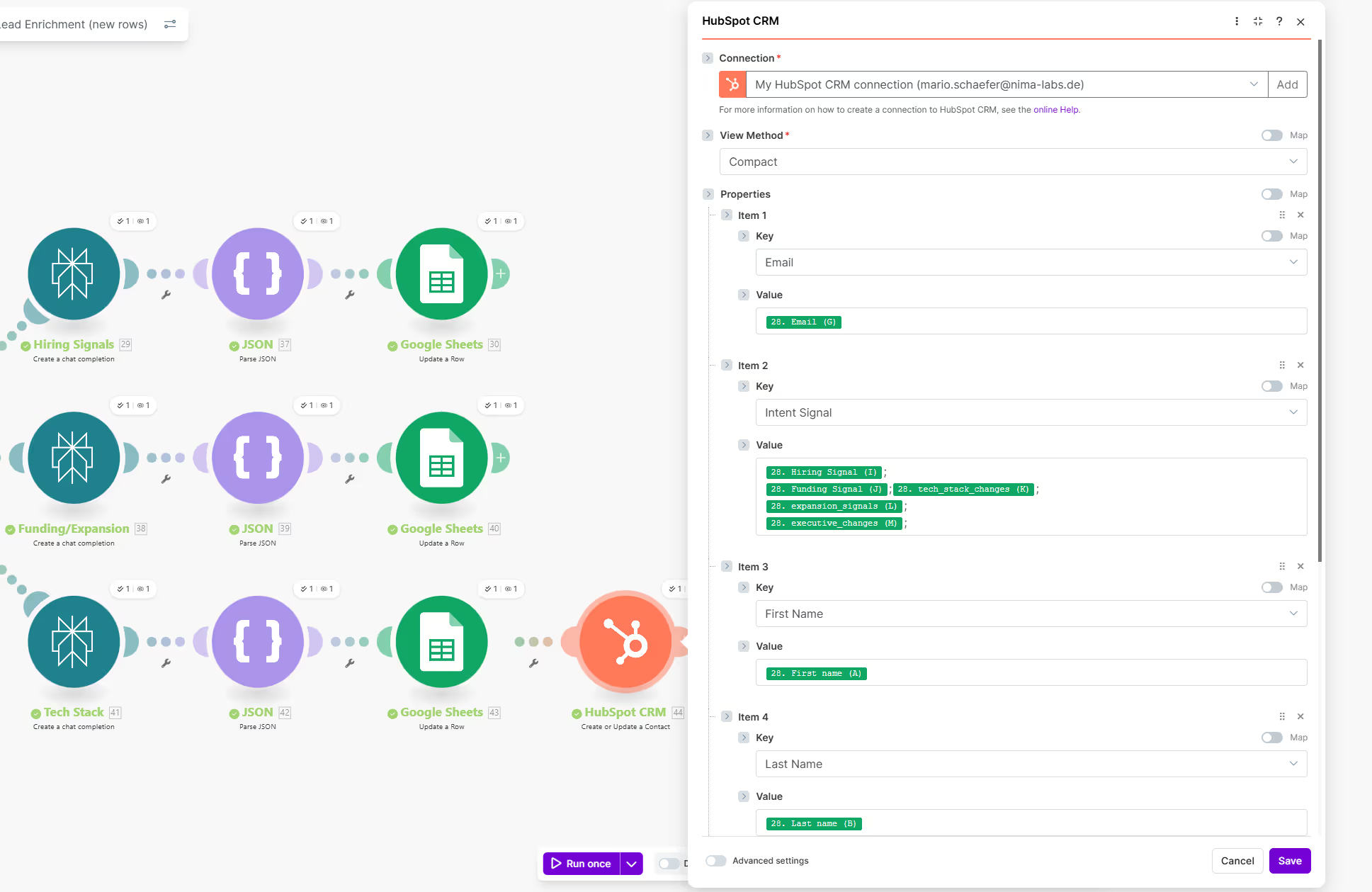
Once your Google Sheet is populated with intent signals, the final step is syncing that data back to your sales tools.
Option A: Direct API Sync (Recommended)
HubSpot:
Make.com Module: HubSpot → Update a Contact
- Contact Email: {{email from sheet}}
- Custom Property "Intent Signal - Hiring": {{hiring_sdr_signal}}
- Custom Property "Intent Signal - Funding": {{funding_recent}}
Salesforce:
Make.com Module: Salesforce → Update a Record
- Object: Lead/Contact
- Record ID: {{salesforce_id}}
- Field "Hiring_Signal__c": {{hiring_sdr_signal}}
- Field "Funding_Signal__c": {{funding_recent}}
Apollo/Lemlist/Instantly: Most have webhook or API endpoints to update contact custom fields
Option B: Scheduled Import (For tools without APIs)
- Export enriched Google Sheet as CSV daily
- Use tool's built-in CSV import with "update existing contacts" option
- Best for: Clay, smaller outreach tools without robust APIs
Field Mapping Best Practices:
Create custom fields in your CRM for each intent signal:
Optional: Intent Scoring
If you want to prioritize leads, create a simple scoring system:
- Hiring for relevant roles: +3 points
- Raised funding in last 6 months: +5 points
- Tech migration detected: +4 points
- Growth indicators (headcount up 30%+): +2 points
Leads scoring 7+ become "hot" and get prioritized in outreach sequences.
What does this cost compared to traditional enrichment?
Let's do the math for a typical B2B sales team enriching 500 leads per month:
To understand the impact of a custom enrichment workflow, let’s compare costs for a typical B2B team (5-8 users) enriching 500 leads per month.
1. Traditional Provider Costs (Annual Contracts)
Traditional data providers rely on seat-based pricing and annual lock-ins, regardless of your actual usage.
2. The DIY Workflow Costs (Pay-as-you-go)
By building your own infrastructure using AI and automation, you pay only for what you use.
- Perplexity API: ~€15 – €20/mo (Calculated at 1,500 API calls for 3 signals per lead).
- Make.com: €10.59/mo (Core plan covers up to 10,000 operations).
- Google Sheets: €0 (Standard workspace).
- Total DIY Cost: ~€30/month (€360/year)
The ROI Gap: A 98% Cost Reduction
The difference isn't just incremental; it’s a fundamental shift in unit economics.
- Direct Savings: Switching from a mid-tier provider (e.g., ZoomInfo) saves you roughly €23,000 per year in vendor fees alone.
- Data Superiority: Unlike static databases, the DIY workflow provides real-time intent—like active hiring, funding, or technology migrations—updated within the last 48 hours.
- Scalability: While traditional providers force you into higher tiers for more volume, DIY costs scale linearly. At 10,000 leads, your cost per lead drops to roughly €0.01.
Revenue Impact Example
Consider a team with a €25,000 average deal size. If custom intent signals improve your lead-to-opportunity conversion by just 5%:
Traditional Stack: €24,000 cost → 10 deals → €250K Revenue
DIY Stack: €367 cost → 15 deals → €375K Revenue
The Net Benefit: €148,640 (Saved costs + €125K in new revenue).
Key Takeaway
Traditional providers charge for access to a database. DIY workflows charge for results. By owning the infrastructure, you move from paying €3.00 per static lead to €0.05 per highly-qualified, intent-driven lead.
When to Choose the DIY AI Workflow
This approach is best for teams that prioritize agility and specific intelligence over sheer database volume.
- You Need Hyper-Specific "Niche" Signals: If your ICP depends on signals that aren't in a dropdown menu (e.g., "Is this company currently migrating from AWS to Azure?" or "Did they just hire a Head of Sustainability?"), AI agents can find this, whereas static databases cannot.
- You Have a High-Value/Low-Volume Model: If you only target 200–500 high-value accounts per month, paying for a 100M-contact database is a waste. You need deep research, not a massive list.
- You Want to Avoid "Vendor Lock-In": If you want to own your data infrastructure and avoid annual €20K contracts that are difficult to cancel or negotiate.
- Technical Flexibility: Your team is comfortable with (or has access to) basic automation tools like Make.com or Zapier.
When to Stick with the Traditional Tech Stack
Legacy providers like ZoomInfo or Apollo still have a place, particularly for infrastructure-heavy sales orgs.
- You Need "Cold" List Building: If you don't have leads and need to generate a list of 5,000 names from scratch based on job titles, traditional providers are much faster. AI is better at enriching known leads than discovering millions of new ones.
- Direct Dials & Mobile Numbers: Traditional providers spend millions on "crowdsourcing" and verifying phone numbers. AI agents can find email patterns and LinkedIn profiles easily, but finding a verified personal mobile number is still a legacy database's "moat."
- Plug-and-Play Simplicity: If you have a large, non-technical sales team that needs to click one button in Salesforce to "Export to Sequence," the friction of a DIY workflow might be too high for them.
- Compliance & Governance: In highly regulated industries, using a SOC2-compliant, established vendor provides a "CYA" (Cover Your Assets) layer that a custom-built script might lack.
How long does implementation take?
Phase 1: Basic Setup (Week 1)
- Set up Google Sheets with required columns (2 hours)
- Configure Make/n8n workflow with trigger (3 hours)
- Test with 10-20 sample leads
- Outcome: Working enrichment for 1-2 intent signals
Phase 2: Agent Refinement (Week 2)
- Add remaining intent signal agents (4 hours)
- Test prompts and refine JSON schemas (3 hours)
- Set up error handling for edge cases (2 hours)
- Outcome: All target signals working reliably
Phase 3: CRM Integration (Week 3)
- Connect enriched sheet to CRM via API (3 hours)
- Test data sync and field mapping (2 hours)
- Train sales team on using enriched data (1 hour)
- Outcome: End-to-end automation from lead list to CRM
Total Implementation Time: 20-25 hours over 3 weeks
Ongoing Maintenance: 1-2 hours/month (updating prompts, monitoring quality)
What results can you expect?
Based on implementations with B2B sales teams (5-20 reps, €2M-€20M ARR):
Lead Qualification:
- 45-60% of "cold" leads show at least one strong intent signal
- 12-18% show 2+ signals (become "hot" leads)
- Sales reps spend 40% less time researching companies manually
Outreach Performance:
- 35-50% higher response rates when referencing specific intent signals
- 28% shorter sales cycles (reps contact leads at right time)
- 22% higher meeting-to-opportunity conversion
Example: Hiring Signal Impact
One company enriched 1,000 leads with hiring signals for SDR/BDR roles (their ICP indicator).
Results:
- 147 companies (14.7%) were actively hiring SDRs
- Prioritized outreach to these 147 companies
- 31% meeting acceptance rate (vs. 12% baseline)
- 18 opportunities created directly from this segment
- 4 closed deals within 90 days
ROI calculation:
- 4 deals × €35K ACV = €140K in revenue
- Cost of enrichment: €70 (1,000 leads × €0.07)
- ROI: 200,000% on enrichment cost
The intent signal (hiring SDRs) indicated budget allocation and timing—transforming cold outreach into warm, contextually relevant conversations.
What are common mistakes to avoid?
Mistake 1: Trying to enrich too many signals at once
Problem: You set up 10 different intent signals because "more data is better."
What happens:
- Cost per lead jumps to €0.50-€1.00
- Agents return lower quality results (trying to do too much)
- You spend weeks refining 10 different prompts
Better approach: Start with 2-3 high-impact signals that correlate most strongly with your ICP being in-market. For most B2B companies:
- Signal 1: Hiring for roles indicating budget (SDR, AE, marketing roles)
- Signal 2: Funding within 12 months
- Signal 3: One ICP-specific signal (tech migration, expansion, executive hire)
Add more signals only after validating these drive results.
Mistake 2: Not validating AI agent outputs
Problem: You trust the AI completely and push enriched data directly to your CRM.
What happens:
- False positives (company "hired CMO" but it's a junior role)
- Outdated information (funding round from 18 months ago marked as "recent")
- Sales team loses trust in the data
Better approach: For the first 100 enriched leads, manually spot-check 20-30 results. Click the source URLs Perplexity returns. Verify the signals are accurate. Refine prompts based on what you find.
Once accuracy hits 85%+, automate fully.
Mistake 3: Generic prompts that return vague answers
Bad prompt:
"Tell me about this company's recent activity"
Bad result:
"The company has been growing and recently posted some job openings."
This is useless for sales.
Good prompt:
"Is {{company_name}} actively hiring Sales Development Representatives (SDRs) or Business Development Representatives (BDRs)? Check LinkedIn jobs, careers page, and company LinkedIn posts from the last 90 days. Return specific roles, posting dates, and source URLs."
Good result:
{
  "is_hiring": true,
  "roles_hiring_for": ["SDR", "BDR"],
  "number_of_open_roles": 3,
  "date_posted": "2024-12-10",
  "source_url": "https://linkedin.com/jobs/view/12345",
  "notes": "3 SDR roles posted Dec 10, 2024 on LinkedIn - specifically for DACH region expansion"
}
Specificity in prompts = specificity in results.
Mistake 4: Not handling edge cases
Problem: Your workflow breaks when:
- Company website is dead/redirects
- LinkedIn company page doesn't exist
- Perplexity can't find information
What happens: Workflow errors stop all enrichment.
Better approach: Add error handling:
IF Perplexity returns error OR response is empty:
  - Write "No signal detected" to spreadsheet
  - Log company name to separate "needs manual review" sheet
  - Continue to next lead
Don't let one broken lead stop 500 others from enriching.
How do you get started this week?
You don't need to build the entire system at once. Start with highest-impact signal for your ICP.
Quick Start (4-6 hours):
Step 1: Identify your #1 intent signal (30 minutes)
Ask your sales team: "What's the one piece of information that, if you knew it, would make you prioritize reaching out to a lead immediately?"
Common answers:
- "If they're hiring sales roles" (indicates budget + growth)
- "If they just raised funding" (indicates money to spend)
- "If they're migrating from [tool your product replaces]" (indicates active buying cycle)
Pick ONE signal. Not three. One.
Step 2: Set up basic workflow (2 hours)
- Create Google Sheet with sample 20 leads
- Add columns: company_name, website_url, [your_signal_column]
- Set up Make/n8n trigger on new row
- Connect to Perplexity API with one agent prompt
Step 3: Test and refine (1 hour)
- Run workflow on 20 sample leads
- Check accuracy of results
- Refine prompt based on what works/doesn't work
Step 4: Scale to production (1 hour)
- Add 100-200 real leads to sheet
- Let workflow run
- Review results
- Sync to CRM if quality is good
By end of day, you'll have working enrichment for your highest-impact signal.
Week 2: Add second signal
Week 3: Add third signal
Week 4: Automate CRM sync
The strategic advantage of owning your data infrastructure
This isn't just about saving money on enrichment tools. It's about control and competitive advantage.
When you own the infrastructure:
You control what signals matter: Traditional providers decide what data fields to offer. You decide what signals indicate buying intent for your ICP.
You control data freshness: Enrichment happens in real-time or on your schedule. Not when the provider's database gets updated (6-12 months later).
You control costs: Scale from 100 leads/month to 10,000 leads/month and your cost scales linearly (more API calls). Provider costs scale exponentially (tier jumping, credit bundles).
You own the learning: Every prompt refinement, every signal that proves predictive, every edge case you handle: That's intellectual property you keep. Providers don't share how they determine "intent" or "fit."
According to Forrester's 2024 B2B Data Management Report, companies that build internal data enrichment capabilities see 3.2x faster adaptation to market changes compared to those dependent on external data providers—because they can add new signals, test hypotheses, and refine scoring models in days rather than waiting for vendor roadmaps.
This is exactly the type of infrastructure I build in EnablementOS and Revenue Architecture systems, moving companies from dependency on expensive external tools to ownership of automated, AI-powered intelligence systems that get smarter over time.
Stop paying rent on your data infrastructure
Look at your current data enrichment bill. How much are you paying per month?
Now calculate: How many leads do you enrich? What's your cost per lead?
If you're above €1.00 per lead for basic enrichment, you're overpaying by 10-50x for data you could capture yourself.
The technology is accessible. The APIs are affordable. The setup takes days, not months.
The only question is: how much longer can you afford to rent infrastructure you could own?