

Most inbound leads die in the gap between "form submitted" and "human notices." That gap is your speed-to-lead problem — and it is not measured in hours at most companies. It is measured in days.
Speed to lead is the time between a lead's first contact with your business and your sales team's first response. The shorter the gap, the higher the conversion. By the time most B2B SaaS companies respond, the lead who downloaded your GTM audit checklist on Tuesday afternoon has already booked a call with someone else, stopped caring, or convinced themselves they can solve the problem internally. Your CRM has a contact record with a first name, a work email, and a source field that says "Website." That is it.
This is not a sales problem. It is not even a speed problem. It is a systems problem — and the system has three specific failure modes.
Where Inbound Lead Conversion Actually Dies
The Dead Lead Problem
No automated routing means inbound leads land somewhere and wait. Shared Slack channels. A HubSpot notification that gets buried by noon. A form-to-spreadsheet Zapier that someone set up in 2022 and nobody fully trusts anymore.
A demo request submitted at 2:47pm on a Tuesday gets actioned Thursday morning. By Wednesday evening, the prospect has signed with a competitor who responded in 11 minutes. That deal never shows up as lost in your CRM because it was never actively worked. It evaporates. At a typical 30-person SaaS company closing €600K ARR/year, that is 4–6 deals per month silently disappearing before the pipeline even starts. Nobody sees it in a report. Nobody calls it a problem. It is just the conversion rate being "a bit low."
The Blind First Call Problem
When a rep does manage to respond quickly, they are calling cold into a warm situation. They do not know which page the lead visited, which lead magnet triggered the form submission, what the company tech stack looks like, or whether this is the decision-maker or an analyst. The first 3 minutes of every call is triage that should have happened before the dial.
Qualified leads drop — not because the rep was bad, but because the rep had no context and the lead expected them to.
The Friction Wall Problem
Even when routing and enrichment work, booking fails. An email goes out, the lead is interested, the lead needs to find a slot — and the friction of "reply to book" or hunting for a calendar link kills 15–30% of the intent right there. Intent has a half-life measured in minutes, not days.
That is the system as most B2B SaaS companies run it: three independent failure points, each losing revenue quietly.
How Long Should Speed to Lead Be?
Under 5 minutes. That is the threshold that separates a functioning inbound system from one that leaks revenue by default.
Response times beyond 5 minutes dramatically reduce the probability of qualifying a lead. Beyond 30 minutes, that probability collapses. The companies winning on inbound in competitive markets — B2B SaaS, FinTech, IT Services — are not faster because they have more SDRs. They are faster because they have automated the routing, enrichment, and first touch entirely.
If your current speed to lead is measured in hours, you do not have a follow-up discipline problem. You have an infrastructure problem.
What Is the Cost of Slow Lead Response Time?
At a 30-person SaaS company closing €600K ARR/year with an average deal size of €25K, losing 4–6 inbound opportunities per month to slow response means €100–150K in ARR evaporating annually — from a gap that is invisible in reporting because the deals were never actively worked. They do not show as "lost." They show as nothing. The cost compounds silently.
What the Fix Actually Is
This is not a routing upgrade. It is not "add Calendly to your email signature." What follows is a qualification and personalization engine — a system where the moment a lead submits a form, a sequence of automated decisions runs in parallel, enriches the contact, scores the intent, personalizes the outreach, and puts a booked call in the calendar, all before a human has been notified.
The rep's job is not to respond. Their job is to show up to a call with a brief that tells them exactly who they are talking to and why.
Here is how to build it.
How to Automate Inbound Lead Routing: 6 Layers
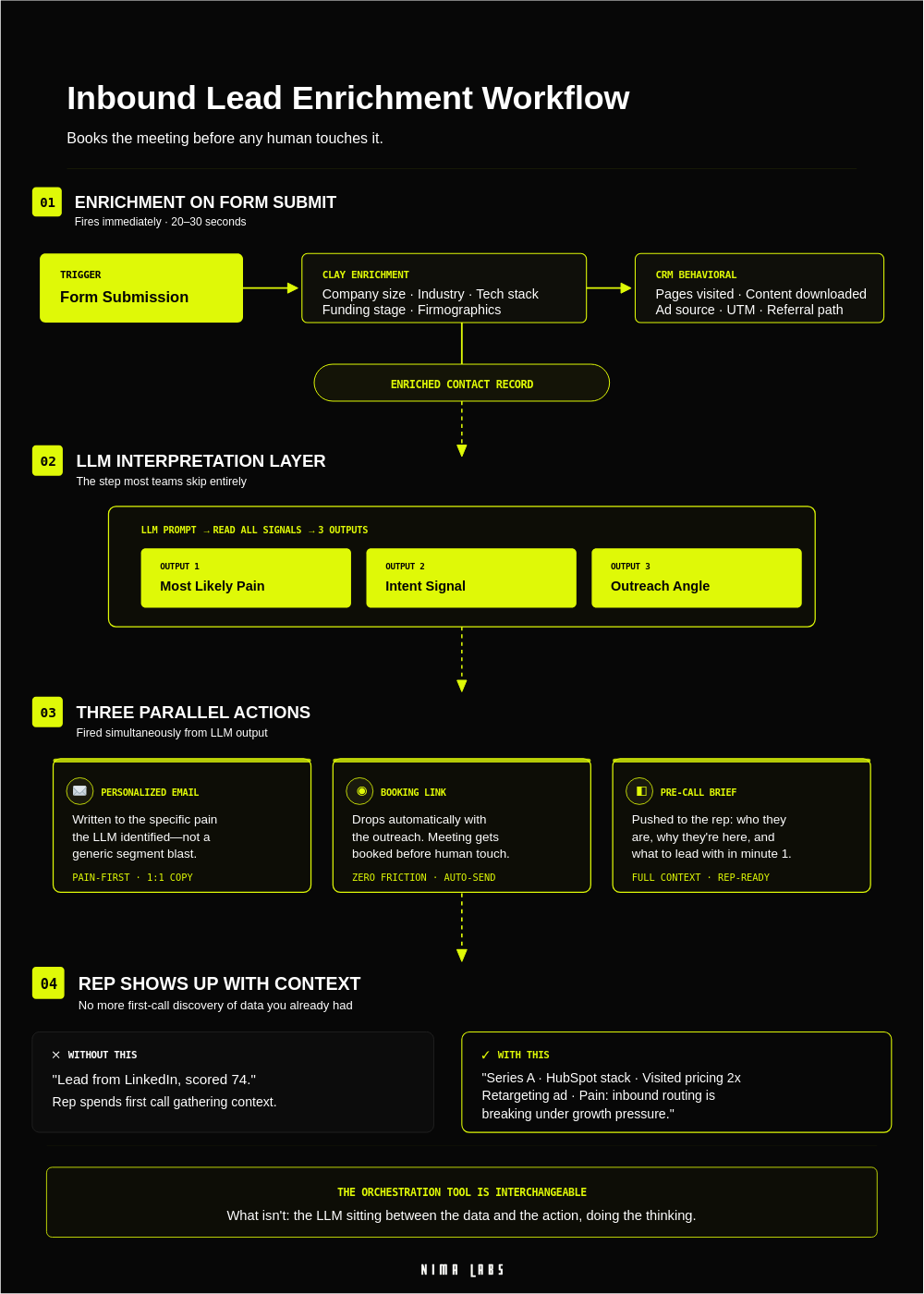
Layer 1: Capture Everything the Lead Has Touched
Before the CRM record is created, before enrichment runs, the system needs to know why this person converted. What brought them to the form?
Set up UTM tracking across every lead source: paid LinkedIn ads, organic content, lead magnets, webinar registrations, and direct website traffic. Make sure your form — HubSpot Forms, Typeform, or a native landing page embed — passes UTM parameters into hidden fields that write directly to HubSpot contact properties on submission.
In HubSpot, track page views per contact using the native tracking code. The moment a contact record is created, you can query which pages they visited before converting. This is behavioral data that most companies ignore entirely.
What you are building here is a content consumption record: the sequence of things the lead engaged with before raising their hand. That record becomes the foundation for personalization in every downstream step.
What to configure:
- Hidden UTM fields on all forms (utm_source, utm_medium, utm_campaign, utm_content)
- HubSpot contact properties: Last Form Submitted, Lead Source Detail, Pages Viewed Before Conversion
- Automation webhook trigger: fires the moment a new HubSpot contact is created with Lead Source = Inbound Form
The automation webhook is your orchestration entry point. Everything runs from here.
Layer 2: Lead Enrichment Before a Human Sees the Record
The webhook hits your automation layer and the enrichment chain begins. This runs in parallel — ideally completing in under 90 seconds.
Clay is where the enrichment actually happens. Your automation tool sends the contact's email and company domain to a Clay table configured with a waterfall enrichment sequence:
- Email verification and personal LinkedIn profile lookup
- Company firmographics: headcount, industry, funding stage, estimated ARR band, location
- Tech stack identification: is HubSpot installed, or Salesforce? What is the current automation tooling?
- Hiring signals: open roles on LinkedIn filtered for Sales Ops, RevOps, or Marketing Ops — a company hiring a Head of RevOps right now is a buying signal, not a cold prospect
- Trigger events: recent funding rounds, executive hires, expansion announcements
Perplexity or OpenAI can be layered in via Clay's AI column to summarize what the company is currently doing publicly — a one-paragraph company brief generated from LinkedIn and website content that writes directly into the CRM record.
Clay writes all enriched data back to HubSpot via its native integration. By the time the record is fully populated, your SDR or Sales Manager has context that a manually-researched call would take 25 minutes to assemble.
Layer 3: Score the Lead and Route It
Not all inbound is equal. A Founder at a 40-person FinTech who downloaded your Speed-to-Lead Calculator after clicking a LinkedIn ad targeting Dubai-based RevOps leads is a fundamentally different record than a student who found your blog post.
In your automation layer — Make.com or n8n both work here — after enrichment completes, run a conditional routing logic block:
IF company_size >= 10 AND company_size <= 100
  AND (title CONTAINS "RevOps" OR "Sales Ops" OR "VP Sales" OR "Founder" OR "CEO")
  AND (industry IN ["B2B SaaS", "FinTech", "IT Services"])
THEN score = "A-Hot"
  AND assign_owner = [Senior SDR or AE]
  AND trigger = "Immediate personalized email + booking link"
ELSE IF partial match on 2/3 criteria
THEN score = "B-Warm"
  AND trigger = "Sequence enrollment, 24-hour first touch"
ELSE
  score = "C-Cold"
  AND trigger = "Nurture sequence"
HubSpot contact properties receive the ICP Score and the routing owner. The A-Hot trigger fires immediately. No human decision required. This is SLA enforcement by design — not by discipline.
Layer 4: The LLM Interpretation Layer
This is where most automation falls apart. Standard lead scoring routes on points. It does not ask what the signals actually mean.
The entire enriched contact record — firmographics, behavioral data, tech stack, hiring signals — feeds into an LLM prompt. The prompt has one job: interpret the signals and determine three outputs.
- What is this lead's most likely pain?
- What does their intent look like — early-stage researching or ready to buy?
- What is the right personalization angle for first outreach, given who they are and what brought them here?
This is the step that separates signal-based personalization from template-based automation. A lead who visited your speed-to-lead content, works at a 40-person company with Zapier in their tech stack, and just posted a job for a RevOps hire gets a completely different email than a lead who came in from a generic Google search.
The LLM output feeds directly into the next layer.
Layer 5: Personalized Outreach and Automated Booking
The LLM interpretation drives a first-touch email — built to the pain it identified, not to a generic segment. Your automation tool assembles the email using the LLM output and sends it from the assigned rep's HubSpot account.
The email ends with one clear action: a HubSpot Meetings link (or Calendly embed) with a specific 30-minute slot type, titled "30-Minute GTM Infrastructure Review." Not "Let's connect." A specific action with a name that signals value.
Intent has a half-life. The email goes out within 5 minutes of form submission. Booking happens before the lead has time to cool off. This is automated booking, not follow-up culture.
Layer 6: The Pre-Call Brief
The meeting is booked. Your automation detects the booking and assembles the pre-call brief as a HubSpot note and Slack message to the assigned rep:
- Who: Name, title, company, LinkedIn URL
- Company snapshot: Size, industry, tech stack, funding status, estimated ARR band
- Why they came in: Lead source, content consumed, UTM campaign
- Pain hypothesis: Which problem is most likely based on signals — output directly from the LLM interpretation layer
- Hiring context: Any relevant open roles
- Suggested opening question: Auto-generated from the pain hypothesis
Fireflies handles the call itself. Post-call, Fireflies pushes a structured summary back into the HubSpot deal record: key objections raised, next steps mentioned, signals that feed back into marketing. This is the closed-loop feedback that makes the system learn over time.
What This Looks Like in Practice
A Head of Marketing at a 35-person B2B SaaS company in Dubai submits a form to download the GTM Audit Checklist at 10:14am on a Thursday.
10:14am — Form submits. HubSpot contact created. Automation webhook fires.
10:15am — Clay enrichment runs. HubSpot confirmed as CRM. Zapier in the tech stack. Two open roles on LinkedIn: SDR and RevOps Manager. Series A, 35 employees, FinTech.
10:16am — ICP Score = A-Hot. LLM interprets: likely pain = inbound routing breaking under growth pressure and a fragile automation stack.
10:17am — Personalized email sent from the assigned rep's HubSpot account. Opening line references the GTM Audit Checklist and speed-to-lead pain specifically. Booking link at the bottom.
10:31am — She books a 30-minute call for Friday at 11am.
10:31am — Pre-call brief auto-generated. Slack hits the rep with full context.
Friday 11:00am — Rep joins the call knowing exactly who she is, what she likely needs, and which question to open with. The call is not a qualification conversation. It is a diagnostic session with a warm prospect.
That is the difference between a 15% close rate and a 40% close rate on inbound. Same leads. Different infrastructure.
Why Inbound Leads Go Cold: A Summary
Inbound leads go cold for three reasons, each a distinct infrastructure failure:
- No automated routing — the lead waits for a human to notice
- No enrichment before first contact — the rep arrives with no context and the lead feels the gap
- No frictionless booking — intent decays before a calendar invite is sent
Fixing one without the others moves the needle slightly. Fixing all three is the engine.
What to Build First, and in What Order
Do not try to build all six layers simultaneously.
- Weeks 1–2: Capture and Route — UTM tracking, automation webhook, basic routing. Speed alone moves the needle before enrichment is live.
- Weeks 3–4: Lead Enrichment — Connect Clay. Basic firmographic enrichment written back to HubSpot. Foundation for every downstream layer.
- Weeks 5–6: Personalized Email and Booking — First email with pain-matching logic. Add the HubSpot Meetings link.
- Weeks 7–8: LLM Interpretation Layer — Feed enriched records into an LLM prompt. This is what converts automation into signal-based personalization.
- Weeks 9–10: Pre-Call Brief — Automate brief assembly. This changes how reps experience inbound.
- Ongoing: Fireflies Loop — Post-call intelligence feeds back into the system. The machine learns from every call.
The full engine runs on your existing CRM (HubSpot or Salesforce), Clay for enrichment, an LLM for interpretation, and your automation layer of choice — Make.com, n8n, or HubSpot workflows. Setup time for the core layers: six to ten weeks if the tools are already in place and someone owns the build.
Frequently Asked Questions
Q: What is speed to lead?
A: Speed to lead is the elapsed time between a prospect's first contact with your business — typically a form submission or inbound request — and your sales team's first response. The shorter this window, the higher the probability of qualifying the lead before intent decays or a competitor responds first.
Q: How long should speed to lead be?
A: Under 5 minutes for high-intent inbound leads. Response times beyond 30 minutes produce a significant drop in qualification probability. At most B2B SaaS companies, actual speed to lead is measured in hours or days — not because reps are slow, but because the routing and enrichment infrastructure does not exist.
Q: Why do inbound leads go cold?
A: Three infrastructure failures: no automated routing (the lead waits for a human to notice), no pre-call enrichment (the rep arrives with no context and the lead feels the gap), and no frictionless booking (intent decays before a calendar invite is sent). Each is a distinct systems failure, not a people problem.
Q: How do you automate inbound lead routing?
A: Connect your CRM form submission to an automation webhook (Make.com or n8n). Route the lead through Clay for enrichment, run a conditional scoring block to assign ICP tier and owner, then trigger a personalized first-touch email with a direct booking link — all before a human is notified. The full sequence completes in under 5 minutes.
Q: What does a speed-to-lead automation stack require?
A: At minimum: a CRM with form capture and contact properties (HubSpot or Salesforce), an enrichment tool (Clay), an automation orchestrator (Make.com, n8n, or HubSpot workflows), and a booking tool (HubSpot Meetings or Calendly). An LLM layer — OpenAI or Perplexity via Clay — elevates routing from rule-based to signal-based personalization.
If you want to map exactly where your inbound breaks today — and which layer to build first — that is what the GTM Audit is for.