

tl;dr: Executive Summary
Most B2B companies build their Ideal Customer Profile once during a strategy offsite and never update it. Six months later, the market has moved. Your "efficiency" pitch falls flat because prospects now care about "compliance." According to Gartner, 75% of companies will break up with poor-fitting customers by 2025, and companies with outdated ICPs see campaigns targeting the wrong people who will never convert. You can fix this by automating ICP updates using sales call transcripts, AI extraction (Jobs-to-be-Done framework), and a validation workflow—turning your static PDF into a living document that reflects what buyers actually said yesterday.
Why do ICP documents become outdated fossils?
You likely built your Ideal Customer Profile (ICP) during a strategy offsite. You sat in a room, debated with your Head of Sales, your CEO and Head of RevOps. You agreed on a target: SaaS companies, €5M–€10M revenue, using HubSpot. You also mapped out why they buy: Efficiency, speed, and growth.
You saved this strategy as a PDF. You pinned it in Slack. And then, you went back to work.
Six months later, that PDF is a fossil and outdated.
The market has moved. Your "efficiency" pitch is falling flat because your prospects are actually worried about "compliance." You are still targeting the right companies, but you are using the wrong message.
Most B2B companies suffer from this value gap. They define who the buyer is (firmographics) and define a first set of pains, map them to their offering, but sooner than later, they rely on outdated assumptions about why they buy (psychographics).
There is a way to fix this without another offsite. You can build a workflow that turns sales conversations into strategy and ICP updates automatically.
Why does marketing guess while sales knows your customers' problems?
The disconnect starts with where the data lives. And when sales-marketing alignment is missing the disconnect becomes even worse.
Marketing operates in "Document Reality." They write content, ad copy, email sequences, landing pages and create campaigns based on the pains and gains defined six months ago. They bid on keywords related to "growth" because the document says that is the primary driver. They target based on the information available in the ICP document.
Sales operates in "Ground Reality." They speak to prospects every day. They know that in the last ten closed-won deals, nobody mentioned growth. They all mentioned risk reduction.
When this feedback loop is broken, or manual, you lose money.
Marketing waste: You pay for clicks and impressions from people who don't care about your message or product. Simply because you speak the wrong language.
Sales friction: Reps ignore marketing collateral because "it doesn't sound like the customer" and leads, because they don't convert.
Stagnation: You continue pitching a solution to a problem the market has already solved and moved on, missing the new problem they are desperate to fix.
You don't need more leads. You need your strategy document to reflect the actual words your buyers used yesterday.
How do you solve a static ICP document with an automated feedback loop?
You can bridge this gap by treating your ICP not as a static document, but as a dynamic database fed by sales transcripts or meeting notes.
I built a workflow that automates this process. It doesn't look at clicks; it listens to voice data and uses the Voice of Customer (VoC) framework.
Gartner predicts that by 2025, 60% of organizations will analyze customer voice and text interactions as part of their VoC program. This isn't optional anymore—it's how winning teams stay aligned with buyer reality.
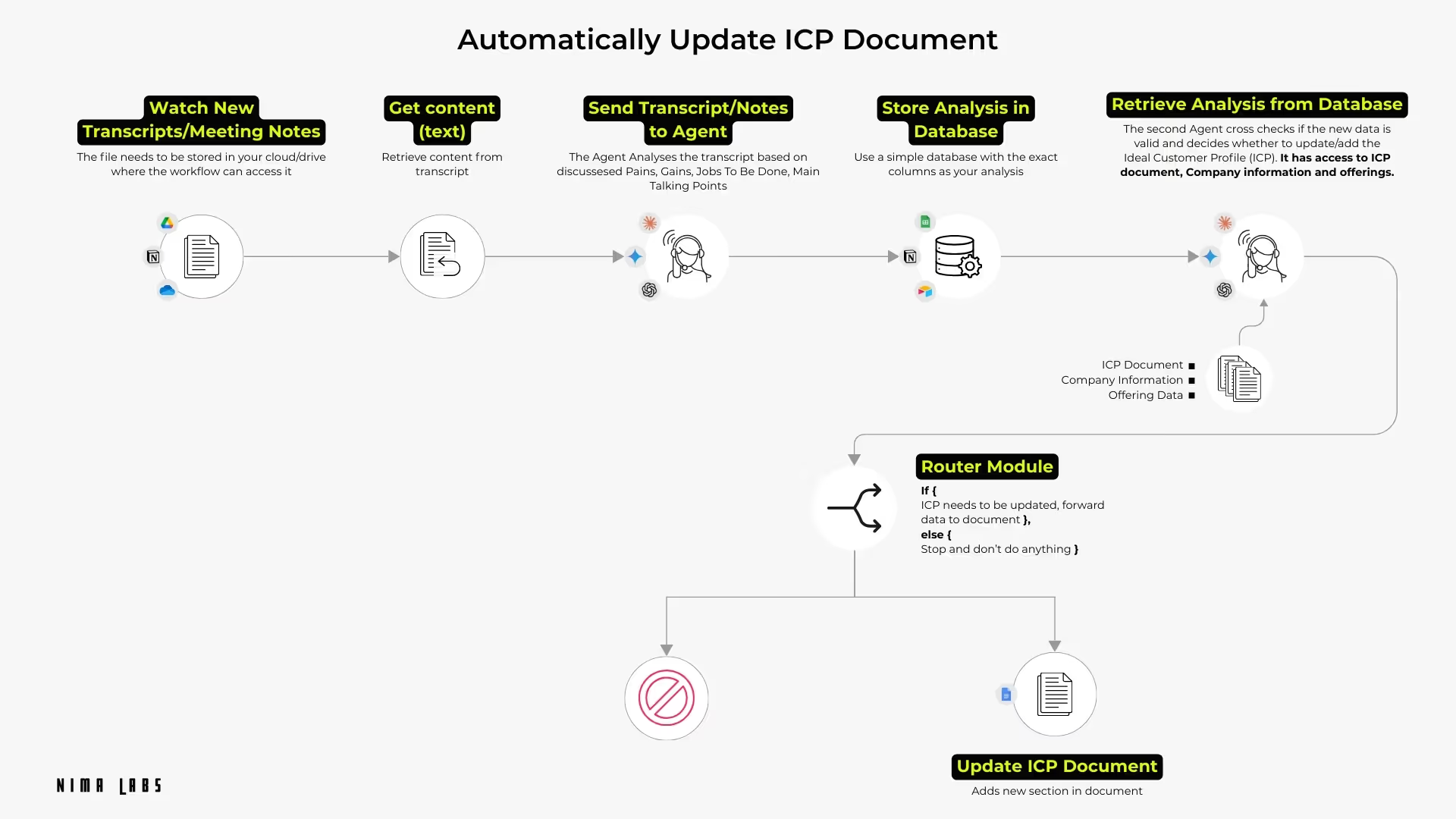
How does the automatic ICP document update workflow function?
Step 1: The Trigger (Capture)
The process starts when a sales call ends. The recording software (like Gong, Google Meet, MS Teams) generates a transcript and saves it to a Google Drive folder. This is the raw, unfiltered and honest data in the customers' voice.
Step 2: The Analyst (Extraction)
An automation platform Make or n8n picks up the file and sends it to an LLM; in my case specifically Claude.
We give Claude a strict prompt. We don't want a summary. We want it to extract four specific data points based on the Jobs-to-be-Done (JTBD) framework:
Pains: What specific frustrations did the prospect voice?
Gains: What specific outcomes were they looking for?
Jobs: What is the "job" they are hiring our product to do?
Talking Points: What specific phrases or objections appeared?
Example Prompt: Sales Meeting Analyst:
Use are a sales meeting analyst. Your job is to analyse the transcripts or meeting notes of
Sales Meetings / Discovery Meetings.

Analyse the the sales call:{{Customer Name}} and Meeting Transcript: {{Transcript Content}}.
Analyse:
- Main Talking Points
- Pains the customer has
- What he wants to achieve
- The Jobs he needs to do / wants done.

Be concise. Do under no circumstance add made up information.

Only output the Analysis in JSON format.
The agent stores this analysis in a simple database (like Google Sheets, Airtable), creating a structured record of a messy conversation.
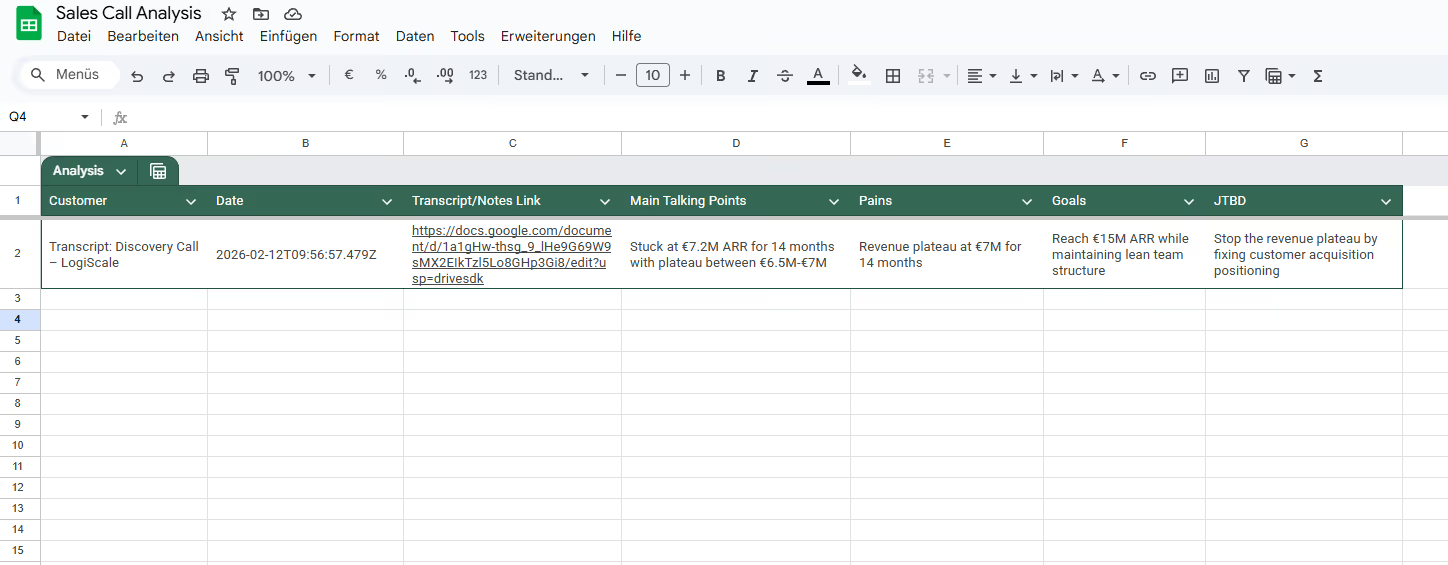
For the complete workflow on extracting insights from sales calls, read From Sales Calls to Revenue Intelligence: How to Automate RevOps Insights
Step 3: The Gatekeeper (Validation)
This is the most critical step. If you update your strategy based on every single call, you will have no strategy at all. You need a filter.
The second AI agent acts as the Gatekeeper. It reads the new analysis and compares it against:
- Your existing ICP Document
- Your Company Information
- Your Offering Data
It asks a simple logic question: Is this a valid new insight, or is it noise?
If a prospect complains about "weather," the Gatekeeper discards it. If a prospect mentions a competitor feature that caused them to switch, the Gatekeeper flags it as a signal.
Example Prompt Gatekeeper ICP cross reference/checker:
You are an ICP Optimization Agent responsible for maintaining and
improving the Ideal Customer Profile (ICP) document based on new sales call intelligence.

Context:
You have access to:
The current ICP document

A new structured sales call analysis containing:
- Pains
- Gains
- Jobs To Be Done
- Goals
- Key Talking Points

Your Task:
Step 1 — Relevance Evaluation
Compare the new sales call insights against the current ICP.
Evaluate:
- Is this pain/gain/JTBD already documented?
- Does it significantly refine an existing category?
- Does it reveal a new high-frequency or high-impact pattern?
- Does it contradict existing ICP assumptions?
- Is it strategically relevant (revenue impact, urgency, decision-making influence)?

Step 2 — Decision
Return one of the following:
A) NO UPDATE NEEDED
If the new information is redundant, minor, or not strategically relevant.
OR
B) UPDATE RECOMMENDED
If the new information:
- Adds a new pain/gain/JTBD category
- Refines existing positioning
- Reveals new decision triggers
- Indicates segment shift
- Changes buyer priority weighting

Step 3:
If UPDATE RECOMMENDED
Generate a structured ICP Update Block in this format:
Update: Todays date
Update type:
[New Category / Refinement / Correction / Segment Shift]
Section to update:
[Pains / Gains / JTBD / Buyer Psychology / Messaging / etc.]
New insight:
[Concise summary]
Strategic impact:
[Why this matters] (Ready to Paste):

Only output this block if update is required.

if update not recommended
DO NOT OUTPUT ANYTHING.

Step 4 — Strict Rules
Be analytical, not descriptive.
Avoid rewriting the entire ICP.
Only propose precise additions.
Ignore one-off comments unless strategically relevant.
Focus on patterns and leverage.
Step 4: The Update (Action)

If the insight is valid, the workflow updates your master ICP document (Google Doc, Notion page). It doesn't rewrite the whole thing; it appends a new section or refines an existing one.
For example, it might add a note under "Key Pains": Update Feb 2026: Shift in buyer priority from 'speed' to 'audit trails'.
What guardrails and tools do you need to execute this?
To build this, you need a low-code automation tool (Make), a database (Sheets/Airtable), and a LLM (Claude) that functions as an agent.
But the technology is the easy part. The logic is where you need to be careful.
You must set strict rules for Agent 2 (The Gatekeeper). Without these rules, you risk "TAM Expansion", accidentally broadening your target market because one bad-fit prospect slipped through. The goal is to refine your focus, not dilute it.
The best approach is to have the workflow flag changes for human review (human in the loop) rather than overwriting core definitions immediately. We call this a "Proposed Update." A human strategist reviews these proposals once a month.
For prioritizing which updates to implement first, use the ICE Score Framework to objectively rank changes by Impact, Confidence, and Ease.
What happens when your ICP becomes a living document?
When you implement this, your ICP document changes from static into a living document.
Marketing checks the document and sees that "Audit Trails" is the new hot topic. They adjust the LinkedIn ad copy the next day. Sales sees that Marketing is finally speaking their language.
Most importantly, you stop guessing why people buy. You let your customers write your strategy for you, one call at a time.
ICP drift happens constantly due to economic shifts, technology changes, competitor moves, new buying behavior, and evolving customer goals. Companies that track and adapt to this drift stay ahead. Those that don't waste budget on campaigns that target profiles no longer optimal.
This workflow updates your ICP and creates dynamic alignment between Sales and Marketing, ensuring both teams operate from the same ground truth instead of competing realities.
Frequently asked questions
How often should I update my ICP?
Your ICP isn't static, it changes frequently. You should review it whenever your market, product offering, or sales data changes significantly. With an automated workflow, proposed updates surface monthly for human review.
What's the difference between ICP and buyer persona?
ICP defines the company profile (firmographics, industry, size). Buyer persona defines the individual decision-maker (role, goals, objections). Both should be updated based on real customer conversations, not assumptions.
Can I use this workflow if I don't have Gong or expensive call recording tools?
Yes. Google Meet, Microsoft Teams, and Zoom all have built-in transcription. You can also use free tools like Fireflies.ai or tl;dv to capture transcripts, which then feed into the automation workflow.
What if the AI extracts wrong information?
That's why Step 3 (The Gatekeeper) is critical. The validation agent filters noise and flags only genuine insights. Always implement human-in-the-loop review before final updates go live.