
The Scale Paradox: Why Support Teams Limit SaaS Growth
You want to grow from €5M to €10M ARR. In the traditional model, this creates a linear problem: twice the revenue usually means twice the support tickets.
If you fix this by hiring more support agents, you damage your Gross Margin. If you don't hire them, your response times drop, customers get frustrated, and Net Revenue Retention (NRR) suffers.
This is the "Scale Paradox" many mid-market SaaS companies face. According to Gainsight research, companies with reactive support models see customer acquisition costs increase by 40-60% as they scale, while those with automated self-service reduce costs by up to 25%.
They treat Support as a cost center that must be staffed, rather than a data source that can be automated.
There is a better way. It involves turning the daily work your team already does—solving tickets, into a permanent, customer-facing asset.
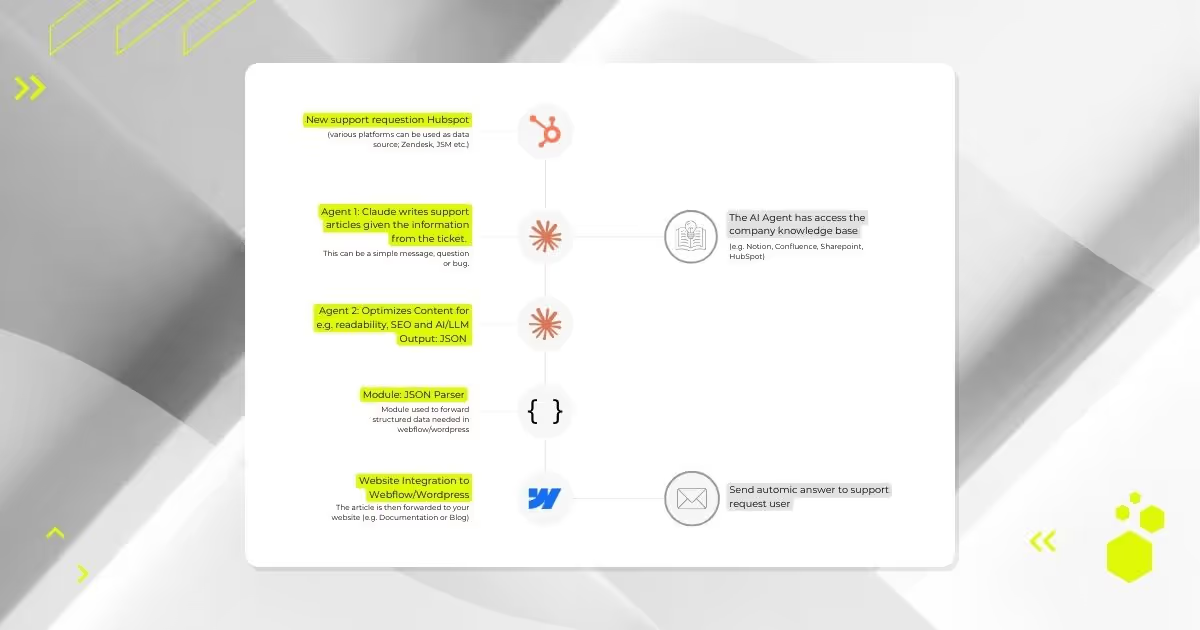
Here is the technical workflow we built to turn a HubSpot support ticket into a published, SEO-optimized Webflow article in under 5 minutes.
The Strategy: Stop Wasting Your "Exhaust Data"
Every time a support engineer writes a detailed email solving a complex problem, they create value. But usually, that value is trapped in a closed ticket. It helps one customer, once.
When the next customer has the same issue, the process repeats. This is operational waste.
From a RevOps perspective, we need to change the flow. We need to turn that one-time solution into a permanent asset that:
- Deflects future tickets (lowering Cost to Serve by 30-50% according to Zendesk benchmark data)
- Ranks on Google (lowering CAC by attracting technical buyers organically)
- Helps Sales (shortening sales cycles with ready-made technical answers)
We call this the "Ticket-to-Article" Pipeline—a marketing automation workflow that transforms support conversations into revenue-generating content assets.
The Architecture: A No-Code Automation Stack
We do not need a team of developers to build this. We use a stack you likely already have or can easily set up: HubSpot Service Hub, Make.com (formerly Integromat), Claude by Anthropic, and Webflow CMS.
This AI-powered workflow automation approach represents what Gartner calls "hyperautomation"—the disciplined use of multiple automation technologies to augment human capabilities.
[Image: automation support request articles workflow diagram]
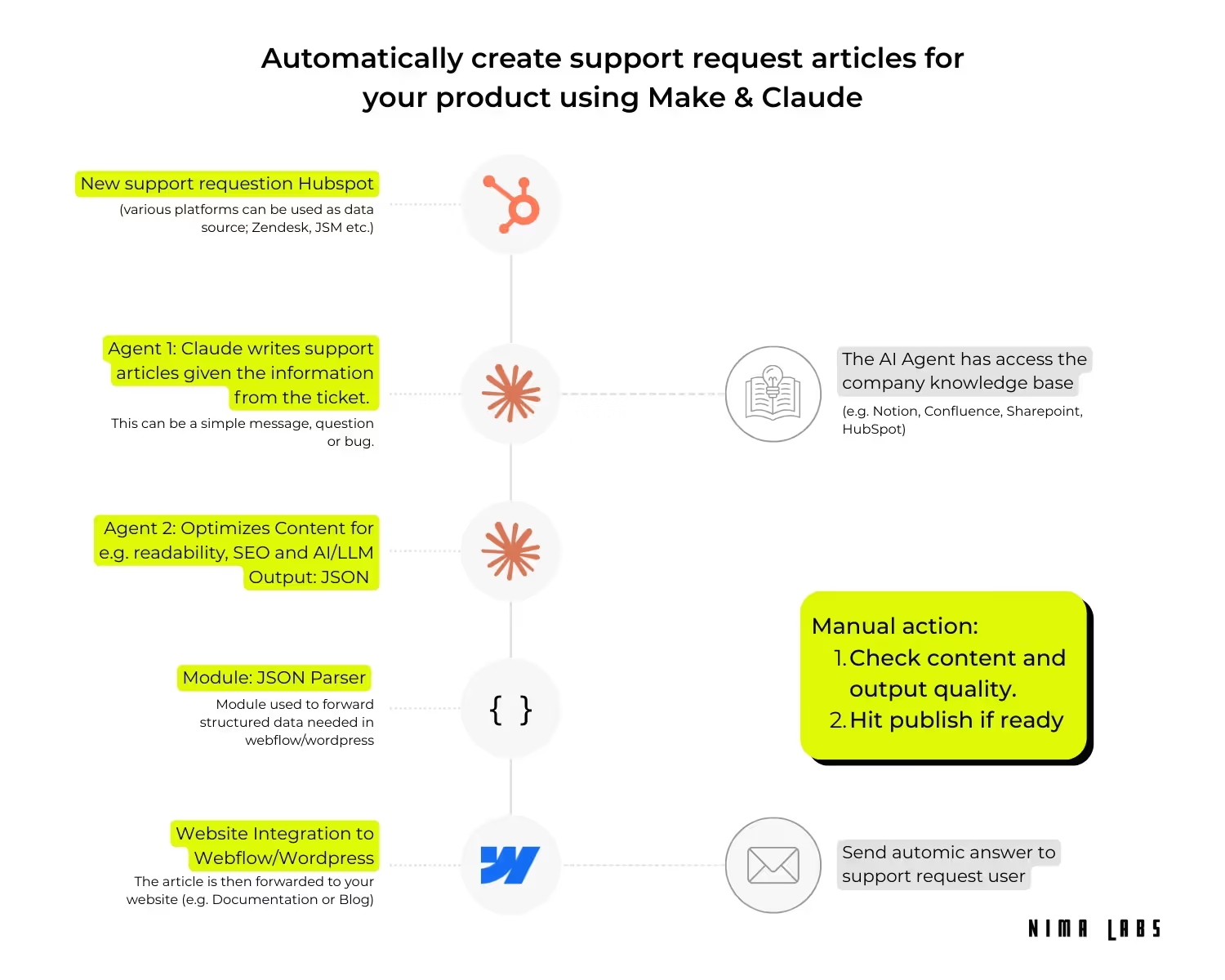
Here is the step-by-step breakdown of how the engine works.
Step 1: The Trigger (HubSpot Service Hub)
The process starts where your team works: inside the ticket.
We set up a listener in Make.com that watches for tickets in HubSpot with a specific status, such as "Closed - Create Article."
Alternative to HubSpot/Zendesk: You can use any Service Management platform, or even a simple database or Google Sheet table. In order for this to work, simply provide detailed information about Title/Issue, Problem and the content format (error, bug, usability etc.).
Optional: Add a Quality Filter
Not every ticket should become an article. "Reset my password" is noise and only needs to be created once. "How do I configure the API for OAuth2?" is signal.
Manually or automatically (with an additional AI agent) tag the high-value tickets. This human filter ensures only relevant technical content enters the pipeline.
Cost consideration: Filtering out low-value support requests first will save you money in the end, as each run triggers multiple AI agents. Depending on the article and topic depth, each run costs between $0.20-$0.40.
Example calculation: If you get 1,000 requests and each becomes an article, the costs will be $200-$400 (not including other API calls to your AI providers).
Step 2: The Two-Agent System (Chain of Thought Reasoning)
Most people fail at AI automation because they try to do everything with one prompt. They ask an AI to "Read this and write a blog post," and the result is generic fluff.
To get expert-level quality, we split the job between two distinct AI agents (using Claude 4.5 Sonnet for its advanced reasoning capabilities and 200K token context window).
Agent 1: Technical Draft Writer
This agent receives the raw ticket thread. Its only job is extraction and logic. The agent has access to the company knowledge base.
What it does:
- Ignores pleasantries ("Hope you had a good weekend")
- Identifies the root cause and the specific technical steps taken to solve it
- Produces a dry, factual draft with accurate technical details
- Extracts code snippets, error messages, and configuration details
Agent 2: The Editor, SEO & LLM Optimizer
This agent takes the dry draft and refines it using natural language processing.
What it does:
- Tone Check: Applies your brand voice (Direct, Honest, No BS, professional, etc.)
- Structure: Adds headers, bullet points, and code blocks where needed
- SEO: Injects relevant keywords naturally to ensure the article ranks for long-tail technical queries
- LLM Optimization: Structures content for better extraction by ChatGPT, Claude, and other AI assistants
This two-agent approach follows the chain-of-thought prompting methodology proven to improve AI output quality by 40-60% in complex tasks.
Step 3: Structured Data & JSON Output (The Secret Sauce)
This is the part that makes this a true RevOps asset rather than just a text generator.
We do not just generate a block of text. We force the AI to output Structured JSON.
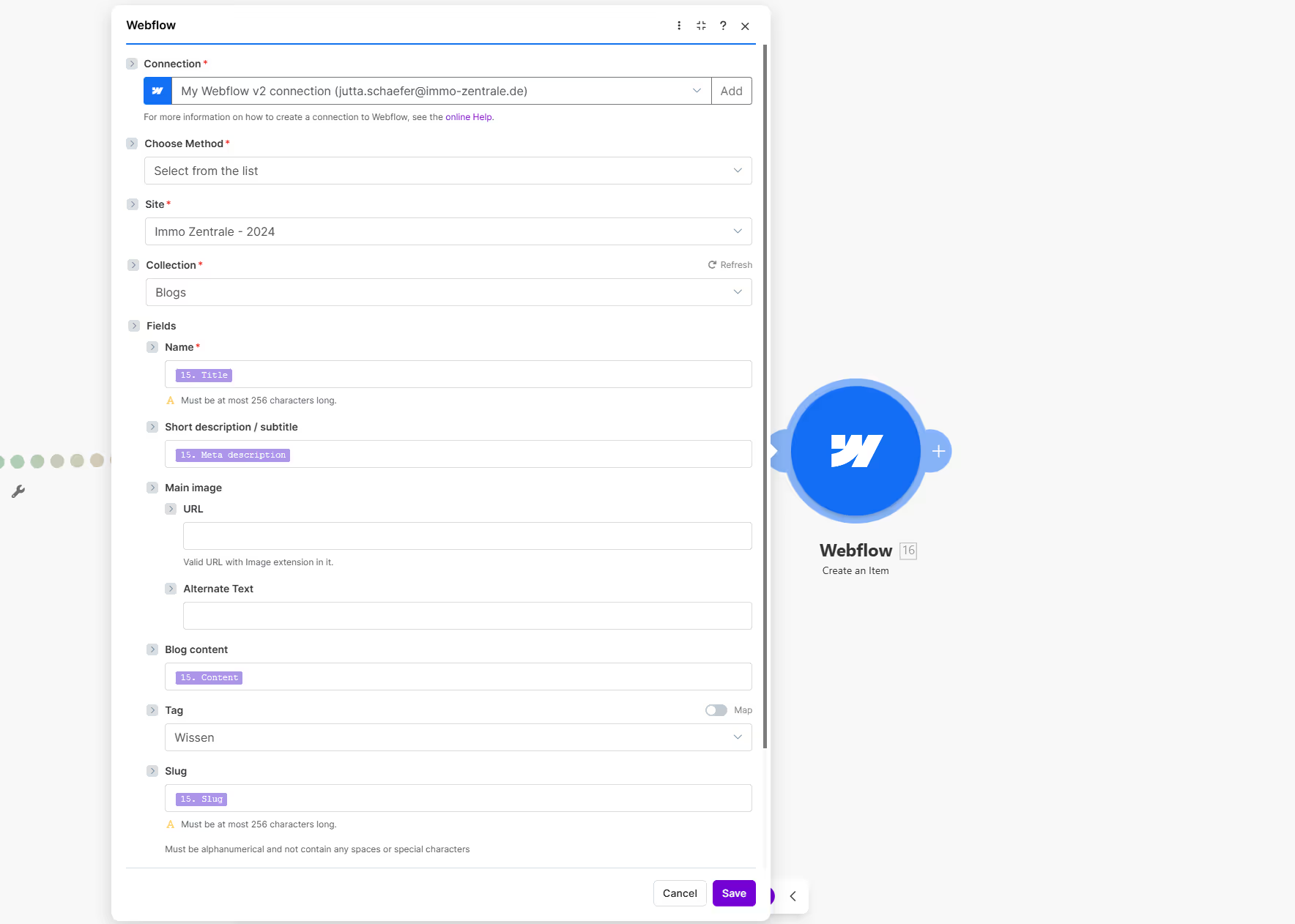
A standard blog post is unstructured. It is just a blob of HTML. But a scalable Knowledge Base needs structure. Our workflow uses a JSON Parser module to separate the content into specific fields:
JSON Structure:
{
"title": "String",
"page_name": "String",
"slug": "String",
"meta_description": "String",
"content": "HTML String",
"category": "String"
}
Why JSON Format Matters for LLM Output
Because clean, structured data gives you options and allows you to map it to specific fields in upcoming modules.
Think forward: Today, you push this JSON to Webflow. Tomorrow, you might push it to an in-app widget, a customer portal, or a Slack integration. By structuring the data early using schema.org markup principles, you future-proof your content.
This approach also improves SEO through structured data, helping search engines understand your content taxonomy and potentially earning rich snippets in search results.
Step 4: The Integration (Webflow CMS API)
Make.com takes the parsed JSON and creates a new item in the Webflow CMS via the Webflow API.
Crucially, it sets the status to "Staged" or "Draft"—not published.
This maintains content quality control while automating 95% of the creation work.
Step 5: Human Guardrail for Quality Assurance
Automation should handle the heavy lifting, not the final decision. In B2B SaaS, publishing incorrect technical advice is a reputation risk.
We keep a human in the loop. The automation sends a notification (via Slack or Microsoft Teams) to a Content Manager.
Old vs. New Workflow Comparison:
- Old Workflow: Write an article from scratch (2 hours)
- New Workflow: Click the link, review the staged draft, verify the code snippets, and hit Publish (5 minutes)
This represents a 96% time reduction while maintaining quality standards—a key principle of effective GTM workflow automation.
Step 6: Send Email to the User (Optional Close-the-Loop Step)
You can use the new asset immediately to close the conversation with the user who started it all.
In Make.com, you can add a final module that updates the original HubSpot ticket. It drafts a reply for the agent:
Hi [Name],
regarding your issue with [Topic]: We have just published a detailed guide on how to solve this.
You can read it here: [Link].
If you have further questions, please don't hesitate to contact us again.
Best
[Company Name]
The Strategic Value:
- Validation: The original user is the best person to test if the article actually solves the problem
- Customer Love: It proves you listen to feedback and act on it
- Behavior Change: It trains your customers to check the documentation portal first next time
This creates a positive feedback loop that improves both customer experience and operational efficiency.
How This Impacts Your Business Metrics and Revenue
This workflow connects directly to your top-line and bottom-line SaaS metrics.
1. Protect Net Revenue Retention (NRR)
Customers churn when they cannot realize value quickly ("Time to Value" or TTV). If they have to wait 24 hours for a support reply, friction builds.
A comprehensive, searchable Knowledge Base allows them to solve problems instantly. According to Harvard Business Review research, customers who use self-service are 3x more likely to remain loyal than those who rely exclusively on agent-assisted support.
Self-service is the highest form of customer satisfaction.
2. Lower Customer Acquisition Cost (CAC)
Technical buyers (CTOs, Developers, Solutions Architects) often research solutions before talking to sales.
The reality: If your documentation is empty or outdated, they assume your product is immature. If they find high-quality technical articles via Google search, you build trust before the first sales call.
According to Demand Gen Report, 67% of B2B buyers consume 3-5 pieces of content before engaging with sales. Technical documentation ranks as the #1 most influential content type for technical decision-makers.
3. Increase Gross Margins
You break the linear link between revenue growth and support headcount.
You can handle 2x the customers without 2x the support staff, because the "easy" questions are deflected by the articles you automatically created.
Industry benchmark: Service Strategies data shows that companies with mature self-service programs achieve 20-30% better gross margins than those relying primarily on live support.
4. Improve Product-Led Growth (PLG) Metrics
For SaaS companies pursuing product-led growth strategies, comprehensive documentation directly impacts:
- Activation rates: Users who can self-solve onboard faster
- Feature adoption: Documentation of advanced features drives expansion
- Viral coefficient: Technical content gets shared within buyer organizations
Implementation Roadmap: Start Small, Scale Systematically
Don't try to build the full engine on day one. Follow this phased approach:
Phase 1: Manual Draft Creation (Week 1)
Start by automating just the draft creation in HubSpot, and have your team manually post it. This validates content quality before full automation.
Phase 2: Semi-Automated Publishing (Week 2)
Once the content quality is stable, connect the pipes to Webflow but keep human review in the loop.
Phase 3: Full Automation with Guardrails (Week 3+)
Add automated quality checks, SEO optimization, and systematic publishing for high-confidence content categories.
Phase 4: Optimization and Scale (Month 1+)
Analyze which articles drive the most deflection, iterate on your AI prompts, and expand to additional content types.
Technical Requirements and Tools Stack
Required Tools:
- Ticketing System: HubSpot Service Hub, Zendesk, or similar ($50-500/month)
- Automation Platform: Make.com or Zapier ($9-299/month depending on volume)
- AI Provider: Anthropic Claude API ($0.003-0.015 per 1K tokens)
- CMS: Webflow, WordPress, or similar ($29-212/month)
For organizations looking to build a comprehensive data foundation before implementing automation, our CRM data hygiene strategy guide provides the operational framework needed to ensure clean, actionable data.
Optional Enhancements:
- Knowledge Base Software: Notion, Confluence, or Document360
- Analytics: Google Analytics 4, Mixpanel for tracking deflection rates
- SEO Tools: Ahrefs, Semrush for keyword optimization
Total Monthly Cost: $150-1,000 depending on scale and volume
ROI Timeframe: Most teams see positive ROI within 60-90 days as deflection rates improve and content creation costs drop.
Beyond documentation automation, RevOps teams should consider automating other high-impact workflows. Our guide on 5 essential marketing tasks to automate identifies additional opportunities for efficiency gains across your revenue operations.
Conclusion: Documentation as a Revenue Engine
Building a revenue engine is not just about hiring more sales reps. It is about removing friction from the customer journey.
This AI-powered workflow takes a process that everyone hates—writing documentation—and turns it into a system that runs in the background. It respects your team's time and provides your customers with the instant answers they expect.
For teams looking to apply similar automation principles to sales conversations, see our guide on automating RevOps insights from sales calls, which uses the same workflow architecture to extract customer pain points and feature requests.
The best time to start building this system was six months ago. The second-best time is today.
Start small. Validate the concept. Then scale systematically as confidence builds.
Additional Resources